Table Of Contents:
Disabled Instagram Account Recovery
Last Update
It doesn’t matter if you are an individual or business, Instagram should be on the top of your social media list. The platform continues to rise in popularity and is second only to Facebook, with over a billion users.
But with increased popularity comes more scrutiny, the platform has specific community guidelines that need to be followed. If not, you risk getting banned from it. Some of the most common reasons why an account is banned or disabled are:
- Posting content that is offensive, violent, or contains adult material.
- Spamming on the platform.
- Aggressively using the platform; if you go around liking, following, sending direct messages, commenting, and or unfollowing people left and right. This is also considered spamming.
- Posting material that is copyrighted without permission.
In order to utilize Instagram to build a following without any issues, it is important you use it within the limits and guidelines. A disabled account can lead to a lot of lost time and potentially the loss of business; much like not having a blog, it isn’t a risk worth taking. It can put a major dent in not just your social media marketing but your overall marketing strategy as well. However, if you do have a disabled account, we have two solutions that can help you recover it.
Recovering Your Disabled Instagram Account

Recovering your account isn’t as hard as it sounds. You just need to be a little creative by convincing Instagram that the account was disabled for others doing. For example, we have two solutions: one revolves around letting a digital marketing agency take the fall for a business account being disabled, and the second scenario blames hackers for disabled individual accounts.
Blaming A Marketing Agency
Instagram knows that a lot of businesses use digital marketing agencies to handle their social media presence. So you can use that to your advantage and basically let Instagram know that the reason why your account is disabled is not through any fault of your own but a lack of Instagram knowledge by the agency.
Step 1: Access the account deactivated form
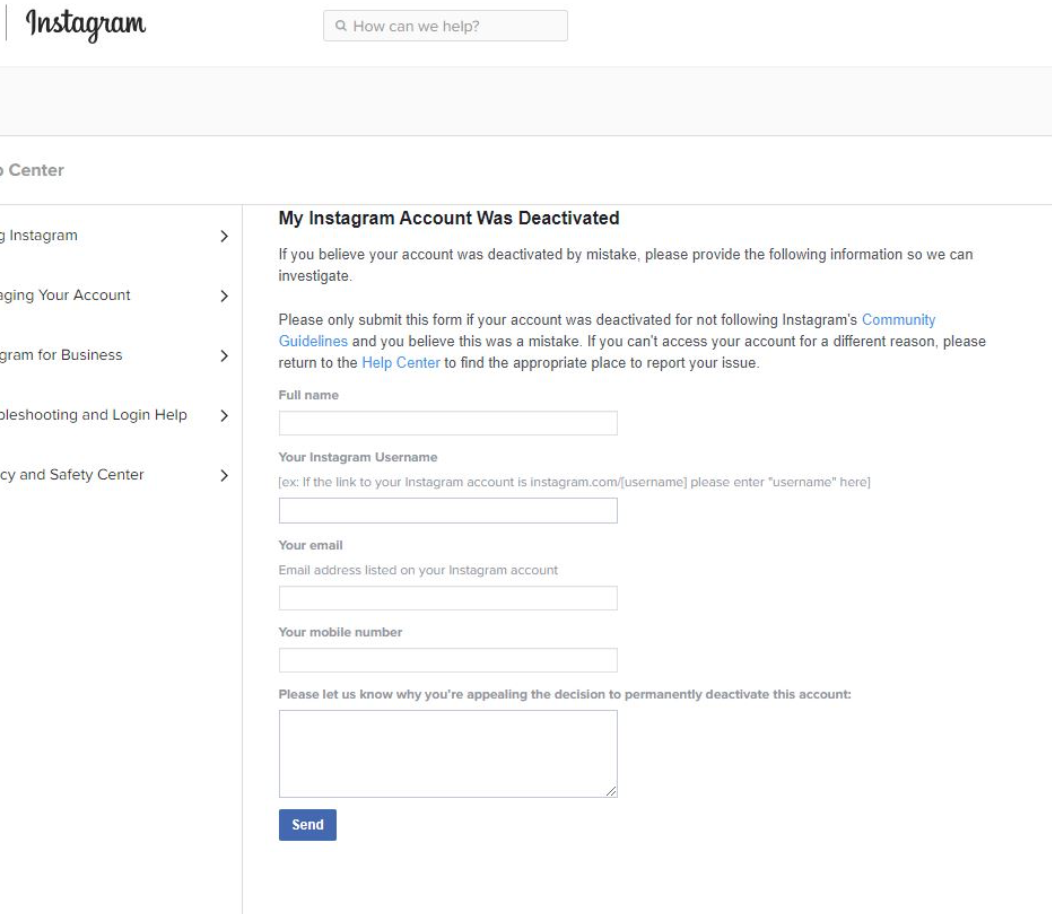
You need to go to Instagram’s Help Center and access the account deactivated form.
Step 2: Fill out the form
You need to fill out all the details within the form. Now, for the appeal within the form, you need to be a bit creative. This is where you mention that the agency pretty much hijacked your Instagram account. While they had discussed a strategy with you, it wasn’t followed and you only found out when the account was disabled. Get as creative as you can here and make sure to put all the blame and misuse of the account on the agency. Then submit the form.
Step 3: Wait for an email and reply
Instagram will then send you an email asking you to verify that the account belongs to you. They will ask for a form of ID for a personal account, or, in the case of a business account, a document that shows proof of ownership. You need to reply to them with the document they request. The platform will then get back to you with their decision, which usually results in the account be recovered.
The same process can be used if your account is ever blocked due to Instagram’s underage policy, the use of the platform for individuals under 13. You fill the form out and Instagram will ask you to submit a photo ID as proof that you are over 13.
Reporting Your Account Was Hacked
We assume Instagram used to get a lot of stories from users with disabled accounts claiming it was hacked. Which is why the platform has hidden this particular method deep within its help center, it wasn’t so hard to access it a few months back. But we have you covered.
Step 1: Open Instagram Support Center
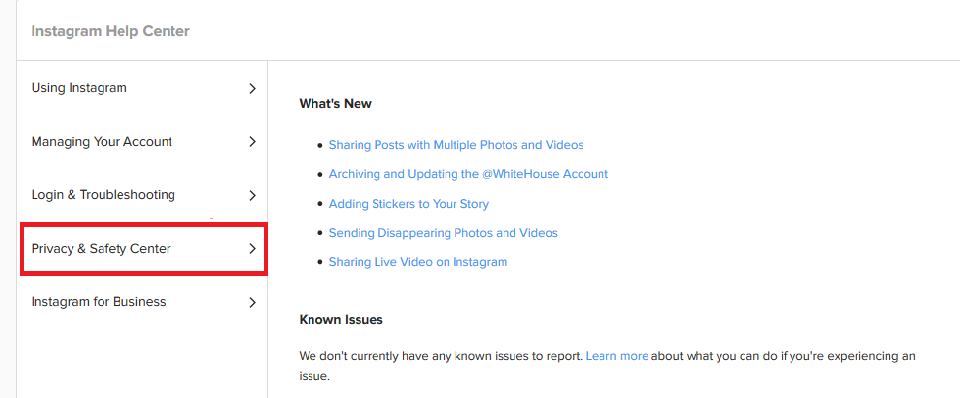
You need to go to the support center within the platform and click on the “Privacy & Safety Center” option.
Step 2: Report something
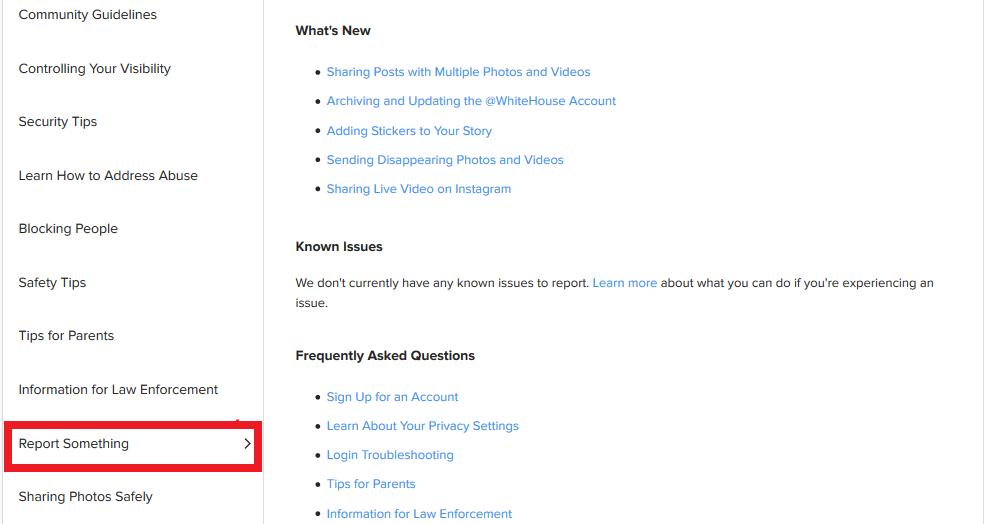
Once the center opens up, you will notice a “Report Something” option on the left panel. Click it.
Step 3: Impersonation accounts
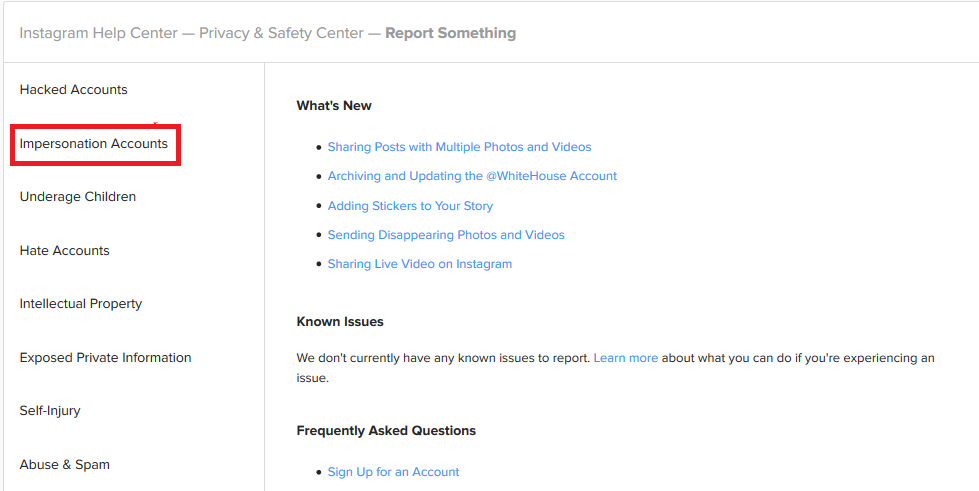
Under report something, the options on the left panel will change once again. You now need to select “Impersonation Accounts.”
Step 4: Fill out the form
You now will see an option that says “What can I do if someone is impersonating me on Instagram?” Within the details, click on the link that says “fill out this form.” Within the form, make sure to select “No” for the question, “Do you have an Instagram account?” You will also need to provide the user name and URL of the account that was hacked. As a part of the form, you will need to upload an ID.
Step 5: Wait for an email
Instagram will then send you an email with additional information they require. These will be details such as:
- Details of the imposter account
- Full name of individual being impersonated
- Name of the account you are reporting
Once the information requested is provided, Instagram will get back to you with their resolution. This particular process allows you to let the platform know that due to your account being hacked, you had no control over what the activities were on it.
Don’t panic or lose all hope if and when your Instagram account is disabled. You just need to be smart about it and use one of the two solutions mentioned above. Once your account is recovered, be sure to follow Instagram’s guidelines to prevent the possibility of the account being disabled again.
https://getplusfollowers.com/services/buy-real-instagram-followers/